Showing posts with label Major Project Reflections on Progress. Show all posts

Wednesday, September 30, 2015

Flipping Over Flipsnack for Communicating Learning

As a recent addition to the Major Project that I'm working on with Genna Rodriguez, I made a digital book. This was to be as a way to share the "other digital pieces" to go with Digital Citizenship. As part of our major project, we will be compiling a continuum for each of the C's mentioned in my last post, in addition to sharing this understanding with teachers in the Regina Catholic School Division. As part of kicking off the initiative to teachers my division, I shared the scope and focus with Tech Leaders, one of whom is the talented Ms. Jillian Laursen (who tweeted about the session).

The information was presented in PowerPoint, which was good for that context, but seemed a little overly-traditional for the content.  So with the purpose of extending my own learning, and communicating learning in a different way, I made a Flipsnack Digital Book (Which is a free site incidently). Genna and I will most likely be adding to this book at some point, as we hope to develop and narrate the book (or slides) - but at least it's a start! Now for a continuum...

Please note that much of the work so far is derived from Michael Fullen's New Pedagogies for Deep Learning as well as the International Society for Technology in Education (ISTE) NETS. We will also be exploring the New Pedagogies for Deep Learning project to examine their work and how it will connect to our own Saskatchewan curricula and school division goals.


So you may be wondering,  what will this Essential Fluencies continuum entail? What we are thinking is that in terms of the connection of the fluencies and curricula is that we noticed that the language for the “C’s” is already embedded in all curricular areas. Meaning, communication is a concept repeated through all curricula, collaborating… same thing. However, with the continuum, we want to explore and expand each of the digital skills for each of these areas from K to 12, modelling the Ministry of Education Digital Citizenship Continuum. We realize that it will not hold a candle to the Digital Citizenship Continuum, particularly in terms of the time factor for us to produce our project.  However, if we focus on the skills and not the tools, we will be able to share this with teachers and change the “tool-centric” focus to instead one that looks at what are the skills students need for life-long learning? How does this skill connect to what teachers wish to explore based on the Curricular Outcomes and Indicators, then what digital tool has the greatest ease of access for the teacher. Noting the differentiated abilities of the teachers in terms of where they are with technology. 

Our overarching goal for the project is to change the mindset of teachers to start looking at essential 21st century skills and the ways technology can leverage currcular outcomes and indicators, and not be the focus of the lessons. (ie: avoid lessons about Powerpoint or Glogster - or creating for the sake of the tool).  As Fullen explores in much of his work, we want to go beyond superficial tech integration, but integration which will allow for deeper learning – through more effective communication with various digital platforms, connections extended because of digital tools, opportunities to further how students collaborate on learning (unencumbered by location and time)… etc. 

Basically this is the plan so far. We will of course have to refine as we go...  


* Please note that although I have this information in my blog post, Genna and I worked on this together.

Monday, September 28, 2015

Our Project Proposal... and My Obsession for the Next 2 Months!

Ready Set... Go! So long going for beverages with friends. So long binge watching marathons of Suits on Netflix... So long sitting and languidly scanning Twitter for hilarious memes (unless it's to tweet about this class of course)... So long long walks dreamily kicking leaves with my hubby in this crisp autumn weather... So long kids... Mommy doesn't live here anymore.... Okay maybe that's getting overly melodramatic... Sort of...

Genna Rodriguez and I are planning on a project which will leverage learning to great heights in our school division. Or should I say depths? As we hope to deepen student understanding and provide teacher tools for exploring the Digital Fluencies for students.

Click here to view our Office 365 Document - The 21st Century Digital Fluencies and Essential Skills for Learners Project. This document outlines our resources which will guide us in our quest. And keep us straight and true to our course...

The following image represents the 7 C's which is our reinterpretation of Michael Fullen's work on Deeper Learning as well as the ISTE NETS. I realize that the gears don't actually fit. So don't laugh! This image was actually really challenging to create. After fighting with Adobe Illustrator, Genna and I finally recruited someone from our Personal Learning Network, Natalie, a graphic designer (who happens to be my sister-in-law) to save us. Yayyy! Go Natalie!


Here are the details for  our major project...

Project Focus: We are exploring 21st Century Fluencies and the Essential Skills for Learners today and tomorrow. We are working on a resource for teachers in implementing the fluencies and the connections to digital learning within an interdisciplinary context.

Project Goal: Build a continuum for each fluency.

Digital Platform for Sharing Project:
* Office Mix - for teachers in understanding the Essential Skills and their relevancy to learning.
* RCSD Drupal site - platform for our school division. We will ensure that outside visitors can view our resources.


Thursday, December 4, 2014

My Final Blog Post... For This Class... But Not Forever...


What does it mean to be connected? What are the benefits of being connected? Why would educators want to be connected?

I have found myself trying to convince educators on the benefits of being connected for the past couple months. It’s not necessarily about being connected to the level we have been in this class. It’s about being connected so that there is an opportunity to explore the best practice and ideas of other teachers around the world. A couple years ago, when I went on Twitter and starting following Twitter educators and EdTech “Gurus”, I started to find that I came out of my “bubble”. The bubble or that network of teachers that one might interact with within their school or their division.

Being engaged in Twitter gave me a chance to talk about education. It gave me a space to converse about the "stuff" I'm interested in, without talking off the ears of my non-teacher friends. Now don't get me wrong, I love collaborating face to face and discussion education. But how often do we actually get that opportunity?Once or twice a month? And even that might be a stretch! So rather than complaining that there is never enough time to collaborate, I found my space in Twitter to do exactly that. A teacher no longer has to wait for a convention or an inservice… the answers can be found in your own PLN via Twitter or in a community like Google+. Others might suggest that many answers can be found reading a book.Read a book? No way, that’s just one person’s perspective. (Actually I'm just kidding, remember I was a Teacher Librarian for a short stint). In reality, by going on-line, a person’s education become not just a selection of reading, but a multimedia digital inservice with videos, podcasts or even communities like the one we engage in.  You know there should actually be a poster... “Take back your own professional development…Don't wait for that inservice... Explore digital spaces to educate yourself!”

Okay, that’s enough ranting… As I mentioned in a previousblog post, I had a chance to present at a Teacher Librarian “EdCamp”. It wasn’t really an EdCamp as all the presenters were kind of prechosen based on a questionnaire sent out. But anyways, it was a start. At the EdCamp, I presented sessions that relate to this class and the point of being a connected educator. My sessions included: MOOCs and Digital PD, Battle of the Books Goes Digital, and Genius Hour. All the sessions went really well. The session that surprised me the most was the excitement over the MOOCs and digital PD. Teacher Librarians were really excited to learn about MOOCs. Many were amazed that universities like Stanford and MIT were offering courses. They were also excited by the number and variety of courses offered through Coursera and Canvas. And many were shocked to learn that they were FREE! As I was presenting and getting the Teacher Librarians to peruse the classes, many started saying, “I’m going to sign up for that one” or “That’s too bad, it’s already started”. Of course a majority of teachers had never heard of MOOCs but this definitely did not suppress their enthusiasm.

After the MOOCs part of the session, teachers started to explore Twitter and the tweets from the “Teacher Librarian Gurus” and “EdTech Gurus”. Intially they thought that Twitter was like Facebook, until I helped them explore my Twitter profile. And I explained who I followed and why (not all 400+), but my top 15. Then people started to get it when they saw the tweets. It became apparent that by being engaged in Twitter I was learning about what was innovative. No longer did I have to wait for some consultant or coach, like myself ;-), to tell me what was new and worth trying out. I was finding out first hand right from the “Gurus” themselves. And what was cool, I could even tweet at these individuals and ask questions. As we explored, many lightbulbs went on. Teachers were starting to see how being connected could make a difference in teaching, and that by being connected, I wasn’t chatting about trivial stuff as what often comes up when on Facebook, I was developing my own Professional Learning Network and it was with those people of whom I wanted to hear their ideas.

Now that’s not the end of my story… sorry, I know I tend to go on and on… That EdCamp was a month ago. Now I’m starting to hear from teachers that they’re learning about Genius Hour, Mystery Skype and Flatclassroom. But the best part is… They are also talking about their Digital PD and “this thing called a MOOC”. The part about this story that I find inspiring, is that many of these teachers heard about these opportunities from their Teacher Librarian. Interestingly enough, and this is worth noting… their TL reached them via Face to Face staff meetings, yet now they are excited about the opportunities to connect digitally. How cool is that???


I’m not sure I have more to add to this last blog post, I will continue to add to this blog. I might have to change up the categories, as I won’t have a “Class Reflection” but I like sharing what’s hot and my perspective on it, or how I would use that tool in the classroom to extend learning. I will also post to the blog roll of my Major Project Website the Teaching With Technology Hub, but in that space it wont be the same. I’m excited to say that my "Hub" with some of my ideas such as sharing “Classroom Digital Stories” (Genius Hour, Blogging and Mystery Skype) is going to be presented at a RCSD Board Meeting in January. (And yes, I'm excited, yet nervous!!!) So I’m a bit torn. This is great, but I feel as though when I blog in that space it will be different than in this space...  In the Teaching With Technology site  I “represent” the division. I will have a “Dual Digital Identity” in some ways. I won’t be able to really state my thoughts without being a little political. In any case, I don't mean to sound negative, I'm actually excited that the site is gathering enthusiasm. Although the "hub" is a website and blog rolled into one, I think that this will still suite the needs of my division. The blog roll will allow me to share the latest "digital story" or project idea, but the website will offer an organized layout to share those ideas. So thank you Katia for sharing this advice in thinking of ways of making it more collaborative. You're right, I needed a space to connect with teachers and offer opportunities for their input. Now I just hope that people will actually comment...

Overall this class has helped me consider how I can have the most impact in helping teachers in my division find ways to connect and explore ways to make their students' learning visible. 

Wednesday, November 12, 2014

Major Project Looming Ahead...

So as I prep for my major project Weebly website, the Teaching With Technology Hub where I hope to promote different ways we can integrate projects into learning... I realize how much I planned and how much I still have yet to finish... sigh... I have a great deal of my Genius Hour project completed, but now I notice tons of errors.... another sigh.

Anyways one of my project pages is using Skype in the classroom, with teacher accounts on why this is worth their while. I am still gathering many of my resources for my pages, and some of my construction is still underway. I repeat, construction is underway. It  took me a looonnnngggg time to finalize the look and the images that I'm using for my pages. This took wayyyy longer than I anticipated. I have resources that haven't yet added (like ppts or screencasts) that I plan on adding to my site. So try not to judge too harshly. Please.

As part of my page, I'm creating teacher materials from different resources I've gleaned from on-line (I am referencing) as well as student resources. I certainly hope that I'm on the right track with this project, because quite honestly, I'm not sure if it's just really amateur. In any case, I've been learning a great deal about different tools and looking for accessible ways teachers can use these resources for Project based learning in the classroom. In many ways, a lot of my project kind of mirrors a great deal of my learning from the class, but I feel I've hopefully made things palatable for the teacher who hasn't taken a class such as the ECI 831, and is perhaps new to tech integration. Hopefully it doesn't seem like a replica of the class, I just want to share some of my learning with other teachers from my school division, and this is my way of doing it.

Anyways, here is my latest Animoto to promote Mystery Skype... A fantastic way to promote collaborative learning playing a game of Mystery 20 questions. The video is short, meant to promote the activity and captivate student attention, but not so long as to bore them before they begin.


Here's a powerpoint for teachers. It's not overly engaging, it's more about just providing the information. I just happened to choose this format.


Sunday, November 2, 2014

Why It's Worth the Time... News from the TLEdCamp!


One of my presentations at the TL Edcamp for RCSD


News From the #rcsdtlcamp


This week I was involved in helping to co-ordinate and facilitate a Teacher Librarian Digital EdCamp for my school division. It was a great opportunity for me to share a little of what I have learned in this class, and explore how the role of the Teacher Librarian is changing with 21st Century Learning. Some of the sessions we offered included:


Exploring Digital PD - Exploring MOOCs and Twitter and the role in the PD and PLN
*One of my sessions!

Genius Hour - What is Genius Hour and how can the Teacher Librarian support this student driven project in the classroom.
*One of my sessions!

Library Website Development - Reasons to set up a School Library page and how to do it via Weebly.

The Power of QR Codes - What are QR codes? How do you make them or use them? How using QR codes can transform a project from being static to inactive spaces.

Digital Curation - Why TL's need to become digital curators. It's more than being a "manager of the books".

Copyleft in the 21st Century - How do you give attribution? What are the rules and regulations??

Digital Book Clubs - How to start a Digital Book Club and resources to the Digital Dystopian Book Club project.
*A project that I explored with several teachers last year, as a grade 8 teacher and Teacher Librarian.

Flatclassrooms - What is a "Flat classroom?" How do you launch it in your own classroom?

Skype in the Classroom - How can Skype be used in the classroom to connect with experts? Connect with other classrooms via the Mystery Skype.

Easy Bib - How to use this citation and research management tool in the classroom

Battle of the Books Goes Digital - How do you incorporate a digital component to Battle of the Books? Why is it worth your while?
* One of my sessions!

Reactions and Fallout


Overall it was a fantastic and energizing day. Many of the Teacher Librarians were a little unsure about where to begin with some of the ways TL's and the school library can "go digital".  However, just as any new digital user,  I think many of them came to the realization that it's about starting small and building from there. Most importantly, I think many realized that it's about not going about things in isolation. As teachers we encourage our students to learn collaboratively as it promotes looking at different perspectives as well as "Group Think" in tackling problems, therefore as teachers we should do the same.

Many of the TL's embraced collaborative opportunities by joining the Teacher Genius Hour Group #rcsdgenius or "Reasonably Intelligent Teachers Who Teach Geniuses". This was something that I started last week using Office 365 (my school division is committed to using Microsoft Office, so I'm determined to find all the collaborative solutions that the product may offer... I know it's not Google, but I think it will work!)

Is It Worth Your Time?


Over and over again, as I conducted my sessions,  I noticed a few raised eyebrows. Some eyebrows were raised in excitement about where to begin... Others - skepticism. One TL even said, "Sounds great, but I don't have time." Hmmm...Time...  Is it about finding time or is it about using our time better? In my own experience I have found that by following some of the best "Guru Educators" (see the links I posted on our Digital PD page) out there, I am able to create my own personal PD or PLN. No longer do I have to wait for a conference to be offered within my division or to use up all my measly professional development funds on a conference, I can find my own presenters by learning about what is out there. With social media, I am finding ways to save time by looking at what's current, relevant and innovative in education. Through social media I can get a taste of what's new and innovative in teaching. I don't have to wait for a consultant or administrator to tell me what is innovative, I can find out for myself.  Anyways that's basically a recap on reasons I explained to TL's on why they should take time for social media to launch their professional learning.

That day, there were a few more Twitter followers who joined the ranks of teachers who saw it as worth a second look, and that it could be used more than just Facebook. Going back to those eyebrows that were raised in skepticism, I think a few were furrowed in concentration as they signed up and learned how to navigate Twitter!

Take a look at a few of the screenshots of our conversations that blossomed!

Where Do We Go From Here??


I think that as a teacher you get a feeling of satisfaction when you see one of your students so excited by what they learned, that they start teaching others. That has got to be one of the best parts about teaching. After my session on MOOCs and Twitter, and after the TL's got fired-up about Twitter, I explored  the open world of MOOCs. Many were stunned by some of the universities who offered MOOCs like MIT and Stanford and the topics that were offered via Coursera and Canvas Network. Digital Storytelling and Minecraft gathered a lot of enthusiasm, especially when we briefly discussed the role Minecraft would play in AR (Augmented Reality) and Maker Movement. I think there were a couple who signed up that day, and I have a feeling that the MinecraftEdu session that I wanted to start in January might be filled up!

Okay... without giving you a play-by-play of the day, I just wanted to say that a lot of what I've learned by being involved in this class helped with setting up ideas for our TL Edcamp sessions. Through more support, I think that Teacher Librarians have the potential to become ALL-ROUND LITERACY  and DIGITAL LITERACY SPECIALIST in the building. All aspects of literacy... from early reading intervention to informational literacy and digital literacy. Many of the TL's get it... for others it will be extending their comfort zone. However the most important thing is that we are all trying to extend ourselves and try new ideas. As educators we all need to ensure that we stay relevant to the times, regardless of teaching assignment. If you look at Teacher Librarians like @JenniferLagarde (Library Girl),  @JoyceValenza or @GwynethJones (the Daring Librarian) one can see the potential of the Teacher Librarian as becoming that SUPER LITERACY SPECIALIST!





Tuesday, October 21, 2014

Digital Storytelling, Student Self Assessment and Digital Portfolios with Powerpoint... Yes Powerpoint!

1,2,3 SHOT! by Macarena C., on Flickr
Creative Commons Creative Commons Attribution-Noncommercial-No Derivative Works 2.0 Generic License   by  Macarena C. 


I love digital storytelling! So much in fact, that I think that this powerful tool can have the power for kids to not only compose stories on-line, but share their learnings about a particular area.

 In the Shelly S. Terrell's wiki, she has made a screencast to go with a slideshow about how she uses Digital Storytelling with younger grades. I really appreciate how she acknowledges the overall benefits when working with EAL/ESL learners and how this technology can help them tell their stories. Digital Storytelling video screencast by Shelly S. Terrell can be found on her site, Technology 4 Kids. She discusses what can be achieved with Digital Storytelling, with very simple ideas shared in an accessible way.

In her wiki, in addition to video resources, there are great samples digital storytelling projects and sites to check out. Other links to see on Digital Storytelling... Cog Dog's site, CogDogroo and Kathy Schrock's Digital Storytelling Site . There are so many amazing options for making this project format come to life!

I think I will be exploring some of these options to share in my major project. I plan on using some of the resources and help a grade 1 class tell their stories in the form of a story circle using tools with Digital Storytelling. In addition to this, I have been working with a Pre-K teacher on a Religion Project that incorporates Digital Storytelling. We decided just to go simple by using Powerpoint to insert pictures and audio of children's narration into the text. Very simple, but very effective for teachers. The beauty is that the Powerpoint format can be shared easily with parents! Although using powerpoint might not be flashy, it still is effective and is easy to use for teachers, particularly those who might not be comfortable with using some of the more complicated tools. Sometimes it's about making the digital tool accessible for the hesitant user, rather than making it complicated or frustrating.

This project got me thinking about how Powerpoint could be used with Assessment and Three Way Conferences. In addition to other portfolio work (digital or paper), students could use Powerpoint to create Metacognitive Digital Portfolios. In this portfolios, students could take pictures of pieces of their work they wish to discuss, insert pictures of the work (if it is in paper, just take a picture and upload) or take a screenshot of other pieces of work, then insert "Metacognitive Points" on the goal of the assignment, what they found challenging and their growth in relation to a particular outcome. Students could then record an explanation expanding upon the Metacognitive Points and insert that audio into the text. This Powerpoint could easily be shared via Office 365 prior or in-conjunction with the report card, thereby starting the dialogue for the Three Way Conferences. One of the benefits of inserting audio, rather than doing a screencast, is so that this portfolio could be an on-going project, and it wouldn't have to be recorded all in one shot.
_D3N1152_fix_6x4_full by Innovation_School, on Flickr

New Screencast - "Unsharing in O365" - Whoot! Whoot!


"Unsharing in Office 365" Link to Youtube
Whoot! Whoot! Another screencast made by yours truly! This time I uploaded and embedded, rather than just copy/pasting from Youtube!

This screencasts is to stop sharing with Office 365, which is Microsoft's version of Google Drive. Anyways I have totally got over my fear of the screencast... Maybe I'll start my own Youtube Channel! :-)

The point of this screencast goes with my major project goal in creating resources for teachers in my school division in using Office 365. I also hope to add other screencasts created by some fellow teachers to my website.

Monday, October 20, 2014

Mystery Skype another aspect of my major project

Skype by ebayink, on Flickr
Creative Commons Creative Commons Attribution-Noncommercial-No Derivative Works 2.0 Generic License   by  ebayink 

My major  project involves the integration and support of many different digital strategies and tools. As a technology coach I don't have a class this year, instead I have many classes!

One of the projects that I would love to support and help teachers bring to life I the classroom is the Mystery Skype. A couple years ago I had heard about this project, so of course I immediately got excited about its potential to engage kids in this collaborative opportunity to learn about other global communities. After talking about it (excessively :)) a couple friends of mine got sucked into the enthusiasm, and decided that they too wanted to try a Mystery Skype. 

Using the power if Twitter, I was able to find partners for my friends using the hashtag #mysteryskype. One classroom was from England, the other was from Ontario. When engaging in the mystery Skype, the students were divided into groups with specific roles to help narrow down the search. 

One aspect that makes the mystery Skype a bit challenging is finding partners of a comparable time zone, this can often put a bit of a hamper on coordinating mystery Skype partners. One way to get through this problem was solved in a post in the Mystery Skype Google Plus Community that I belong to. I think the author is definitely onto something with the "Asynchronous Mystery Hangout". Check it out!

Mystery Skype w/ Mrs. Elsey’s Class by 21innovate, on FlickrIn addition to finding Mystery Skypees on Twitter, you can find a fellow Skypee via Google Community! Check out the Mystery Hangout for Education Google Community and the Mystery Hangouts for Foreign Language Teachers


Teachers can also find out more about Mystery Skype via Skype in the Classroom and sign up to register.


Creative Commons Creative Commons Attribution-Noncommercial-Share Alike 2.0 Generic License   by  21innovate 

Sunday, October 19, 2014

Major Project Screencast for O365

Made a screencast for Setting a Start Page in Office 365! I still hate my voice!!!

Genius Hour Launch and Lock

Ideas for Genius Hour by mrsdkrebs, on Flickr
Creative Commons Creative Commons Attribution 2.0 Generic License   by  mrsdkrebs 

So I've been composing my documents to support teachers in Genius Hour and thought I should go through the fabulous Live binder of Genius Hour Documents curated by Joy Kirr and start curating a few of my own ideas of how I would launch Genius Hour in my classroom.


1. Play Genius Hour video that I created to generate enthusiasm.

2. Review the following Powerpoints to get acquainted with Genius Hour.


3. Get students to start brainstorming some of their passions and things they care about. What would they like to learn more about if they had time. What question is a "big", deep, thought-provoking question about their topic. How will they carve out the essential question. I think I would use Langwitches blog to assist in formulating questions...

4. Present an "elevator pitch" for a project. This is an idea that comes from Kevin Brockhouser's blog, "I think, I Teach"
"What is an Elevator Pitch? can be summed up as follows...

The term comes from the notion that an innovator with a great idea might find herself in an elevator with a powerful investor. She has a very short period of time to convince this investor to buy into her idea. She needs to deliver an elevator pitch.

For their Genius Hour projects, students must prepare a pitch about their Project in 30 seconds. Then deliver their pitch to the teacher in the form of a podcast (use tablet record devices). It follows the model established by a cheesy video from YouTube explaining an elevator pitch.


I also like some of the resources from Mr. Baroody's blog , The GA 20 Time Beta Test

Pitches Should Include:

1. Why is it worth my time to learn about this?
2. How is it going to make a difference in the world? How will it inspire others to learn?
3. Do I realistically have the resources to learn about this?
4. Do I have the time in 8 weeks to learn about it?
5. Is my essential question or driving question too narrow or too wide?

Genius Hour is coming to RCSD! Whoot! Whoot!

Getting Ready for New Beginnings...


So one aspect of my Major project is to create a space for teachers to collaborate about Genius Hour. I think that this project is so worthwhile, I thought that when you have something like this, it can't happen in isolation. So to kick off Genius Hour in my school division I prepared a collection of resources and a powerpoint explaining some information about Genius Hour, shared a presentation that a friend had worked on for the project, created a video to engage kids in Genius Hour, then had a face to face meeting with potential participants in the project. Although having a f2f meeting may seem like it's taking a step back from digital learning and sharing, I realized that sometimes people just need to have a face to face meeting especially when there are so many levels of comfort with technology. And quite honestly, I didn't want to turn off the "non-techy" people from trying Genius Hour in their classrooms by having too much technology thrown in their face right away. So I used the "old-fashioned" method of communication to invite participants to a meeting... email! :-)

The Meeting...

In my meeting I had about 10 people show up, mostly from Regina Catholic. I also had about 6-7 others who stated they were interested, just couldn't make the meeting. So to start teachers off, we examined the concept with my powerpoint, "What is Genius Hour?" - which I also Tweeted so that participants could reference it later, followed up with a quick exploration of hour to launch it with students and a discussion of the purpose of our meeting.  I also shared a Student Genius Hour power point that my friend Matt Bresciani @mattbresciani  had used to launch Genius Hour in his classroom, so I persuaded him to share it via Twitter as well.  I also created a Genius Hour video via Animoto to help teachers gather enthusiasm for the project for students. Finally, I proposed that we would collaborate via a shared folder/ document on Office 365 (similar to Google docs, but a Microsoft product) and Twitter. Our new discussion hashtag for Genius Hour will be #rcsdgenius . Yaaaayyyy, our hashtag for the project was born!

Moving Ahead...


So, right now I have a small collection of people who have Twitter accounts and individuals who are also new to sharing via Office 365... My school division, Regina Catholic, doesn't seem to have a lot of teachers who were accustomed to using Google Drive, so I think I have a bit of work cut out for me... It's all good - they'll come around. It will just take time. I'm just excited to have started my group of "Reasonably Intelligent Teachers Who Teach Geniuses" of whom will be collaborating and sharing - then in turn get their kids collaborating and sharing. It should be a great adventure!

My Genius Hour Video

Feeling Excited for the possibilities...


My Genius Hour Powerpoint That I Shared With Teachers


So why the QR Code? 

This is a recent tool that I've been experimenting with in my role as a Technology Coach. They are kind of gimmicky, but they really seem to captivate people. On a side note, they could allow for fast directions for students or they could be a fun way for a student to share their genius hour learning in a portfolio... Links to their screencasts for the blogs or to blog entries. Just some thoughts! 
By the way, the QR code is linked to the actual Powerpoint.


Sunday, October 5, 2014

Here We Go...


Road less traveled. by mysza831, on Flickr
Creative Commons Creative Commons Attribution 2.0 Generic License   by  mysza831 

I've been curating tools and resources for my Major Integrated Project and finally I was ready to start designing my website. I decided to go with Weebly for my project rather than a blog just because I thought it would be nice to try a different platform for publishing. It only seemed to make sense being that one of the overarching goals of this class was to encourage us to extend and push ourselves with our own learning in the digital realm. So in addition to the daily mental push I exercise with my current position, I thought I should also do that in my project.

The first consideration I had to make was deciding what picture to use for my home page  in my website. Weebly offers a great selection of "stock" photos. None of them seemed like those you sometimes expect with free. After perusing the images for 20 minutes (there aren't that many... I just had a difficult time selecting) I decided to go with a "train tracks - landscape" view rather than the standard computer /digital devices image. So why not the digital theme? It was because I wanted to make the focus of this page to be about learning with technology as the digital vehicle... not learning about digital devices or tools. I also like the train track imagery as it also connected to the whole concept of what direction or path with digital learning take you. I also kind of liked how the landscape seemed to be one you could associate with Saskatchewan... well the north anyways.... Like I said, it was a hard decision... There was a lot of thought that went into my overall theme website images.

This week I plan on adding my powerpoint that I created that highlights Genius Hour resources as well as classroom blogging resources. My blogging resources presentation was actually made with  Mimio Notebook software, but I may have to just convert it to Powerpoint for the purpose of sharing on Weebly. However, I may actually try to upload my Mimio presentation to the Office 365 and create a link to share it. It all depends if users can actually open the link...

One final comment... my website name was taken. Imagine that!?!? I wasn't original. Argghhh! So rather than going with Teaching with Technology... I changed it to the "Teaching With Technology Hub" - As I want it to become a space for teachers to collaborate. I'm still considering for the interactive element of the website, whether or not I should go with a link to a Google Community, a Wiki, blog, or just sharing on a Office 365 doc (like the Google doc concept). My school division recently went with Microsoft Office 365, so I'm not sure if I should go the Google route. Hmmmm... Any suggestions on the best forum for collaboration?


Sunday, September 28, 2014

Thoughts on My Digital Project - Change is Good!! Right??


I got an idea for my Major Digital Project... Again!!


lightbulb light by Mycatkins, on Flickr
Creative Commons Creative Commons Attribution-Noncommercial-No Derivative Works 2.0 Generic License   by  Mycatkins 

Like many others in this course, I too have changed my mind. I started off excited to explore a MOOC on Flipped Teaching. Examined the resources, found them a bit dry and too theoretical, so I went in search of another MOOC. Found one on Coursera via University of Houston (looks like a few people found the same one) and decided that although I will use the resources and share the great site that MOOC contributes to, Educational Uses of Digital Storytelling,  I don't want to get bogged down with just learning this one tool for on-line sharing and learning. Then, I thought that I would participate in on-demand video on Mimio Lesson Development and Training via MimioConnect and Mimio "Ask a Master" Videos via Youtube and share my progress, but that plan didn't seem right either. So... I have decided that instead I am going to construct a blog or a Weebly website that reflects different digital integration strategies that I want to promote and support in my school system. As I'm sure you have gathered, or perhaps you have read in past blog posts, I will not have my own classroom this year, instead I will be assisting other teachers with integrating technology with their "digital endeavors". So to support those teachers I will be curating resources (some of my own, others I have curated from other sources) to support learning in the form of  a Weebly Website.

So, to further the work of our past Technology Coach and promote the same initiative for digital integration, I will still use the name "Teaching With Technology" to maintain consistency within my school division, But of course the work will of course be my own....

Digital Integration Initiatives that I hope to promote and support will include:

1. Skype in the Classroom - What's the Hype with Mystery Skype? How to "play" geographical 20 questions around the globe. How can use the "Skype in Classroom" resource.
2. Blogging 101 for Teachers  & Classroom Blogs - How can classroom blogs increase communication and engagement and why it's worth the time.
3. Student Blogging - How to get started and the benefits to learning... from reflection, to collaboration to metacognition. Plus, blogging initiatives such as Quad blogging and Global Blog Challenges.
4. Digital Assessment Possibilities - Portfolios and the integration of digital tools available to teachers in RCSD, like apps such as "Explain Everything", "Pixie" and "Aurasma".
5. Inquiry and Genius Hour - Information on how to manage Genius Hour, curricular connections and how to connect with a Community of "Reasonably Intelligent Teachers Who Teach Geniuses"
6. TED Talks Regina Catholic - Why students should share their Genius Hour projects and how to do it in the form of video TED talks.
7. Office 365 - Learning and Sharing in the Cloud for Teachers in Students - How to do more than share files with Microsoft Office 365...
8. Interschool Book Blogging - How to set it up, manage the discussions and assess. Plus a sample unit that I initiated and co-created last year, titled, "The Interschool Digital Dystopian Book Club Project". I could also help to coordinate Interschool Blogging Buddies...

In Weebly the 8 Initiatives above will be "static" pages. The blog roll will be "Classroom Connections" where individual teachers could share photos or ideas with me, then I can report on these initiatives in the blog roll.

Now I just need to think of a place where my Genius Hour Teachers can collaborate. I could set up a Google Community... or a shared folder with Office 365. I need to think further about this one.

So what will I call this project???? Maybe the "Teaching With Technology Hub"... Other ideas??

Sunday, September 14, 2014

Genius Hour - an EdTech Project that I Want to do Right Now!!!

CALLING ALL TEACHERS WHO MAY WANT TO JOIN THE COMMUNITY OF EDUCATORS WHO TEACH GENIUSES...


This spring I happened to come upon a tweet about Genius Hour. After further research into the concept and watching a video, I immediately started to think about all the potential it had particularly with the connections to inquiry. Actually it was more than just connections to inquiry - Genius Hour is inquiry. It's basically the inquiry model wrapped up and re-labeled with a really cool name. What would inspire kids more... "Hey class, we are going to explore your questions about any topic that interests you using the inquiry model..." OR "Hey class, for one hour a week you are all going to have the opportunity to become geniuses, as you explore all your own questions about any topic you choose." What would grab your students?

If you wonder what Genius Hour is in the classroom, it provides the students a lesson a week to work on something they are passionate about and discover their inner ‘genius’.

As a former Teacher Librarian, I immediately saw Genius Hour as a great opportunity for students to explore their own interests using the inquiry questioning and reflecting model, as well as digital tools to act as the vehicle for finding answers and sorting what they had found. Anyways, this year I am in a unique situation. I am a teacher without a class. Who will be my guinea pigs to get involved and get inspired in this learning opportunity?? After some discussion with my husband, who is also in education, it soon became apparent that Genius Hour is something that caught the attention of many teachers this Spring. Over the summer, teachers from Regina Public had been curating resources and partaking in their own digital PD. They even went so far as to have Skyped-in discussions with one of the writers of Genius Hour. Now I have to be honest, I felt a little jealous... Here was a group of other Saskatchewan teachers who were also interested in integrating Genius Hour in the classroom... and I didn't even know about it. The funny thing is, I didn't find out about them via Twitter or Facebook. Instead I found out word of mouth from my husband... Aghhhhh!!!!

Anyways, going back to my problem... Being that I don't have a class to try out Genius Hour on, I would like to find classroom teachers who would like to try Genius Hour (I might start off by focusing on grades 5-8, just to keep it manageable). I also think that in a project such as this, where kids are exploring their own passions, should this be left in isolation. So as part of my role as a Technology Coach, I hope to help create a community of "Genius Hour Classrooms" where teachers can share resources for guiding the genius energy and also find ways of allowing the budding geniuses to share their findings with the world or at least other peers (this is actually one aspect of Genius Hour... Geniuses must share their findings in some way with the world). Perhaps the budding geniuses could team up with other geniuses with similar projects and bounce ideas off each other, all within a digital forum.

So where to begin. What digital tools would be effective for curating genius resources? Livebinders? Google docs or OneDrive?

What tool would be beneficial for the budding geniuses to record their reflections on the findings? Blogging?

How will they share the findings? Skype? Lync? Edmodo??

Finally, how can teachers collaborate? Wikis? Google+ Communities? Twitter? Facebook? I'm just not sure what tool would be the best. Ideas??

If you know of teachers who might be interested in joining the "Community of Educators who Teach Geniuses" please let me know. I think it might be fun to start this group right away, at the beginning of the year. Later on, I also think it would be cool to get students to showcase their projects via a mini TED talks.

If you are interested in checking out my curated resources, here is a GeniusHour LiveBinder created by Joyce Kirr that I found...  She does a great job of explaining how to get started and how to manage the geniuses in your classroom.

And other links that I have curated....

Dan Pink - "The Puzzle of Motivation"
Tapping into intrinsic motivation and rewards....

Genius Hour and Getting Started from Edutopia

The Genius Hour Book (which looks at Genius Hour and other Inquiry and Problem Based Learning Ideas)

The blog, "My Own Genius Hour" for fantastic resources like another 
Live Binder, weblinks, videos etc....


Genius Road - A blog with great digital ways to bring Genius Hour alive

Ms. Bertrand's Class Blog - Great resources to help explain the concept - love her explanation of what it is.

Tuesday, September 9, 2014

New Beginnings for MOOCs and Flips

This is the year of new beginnings...

- I got a new position as a Technology Coach, after 17 years teaching middle years students.

- I started a new class for Grad Studies with EC & I 831.

- I enrolled in a MOOC... Which I intend on actually completing this time... Maybe.

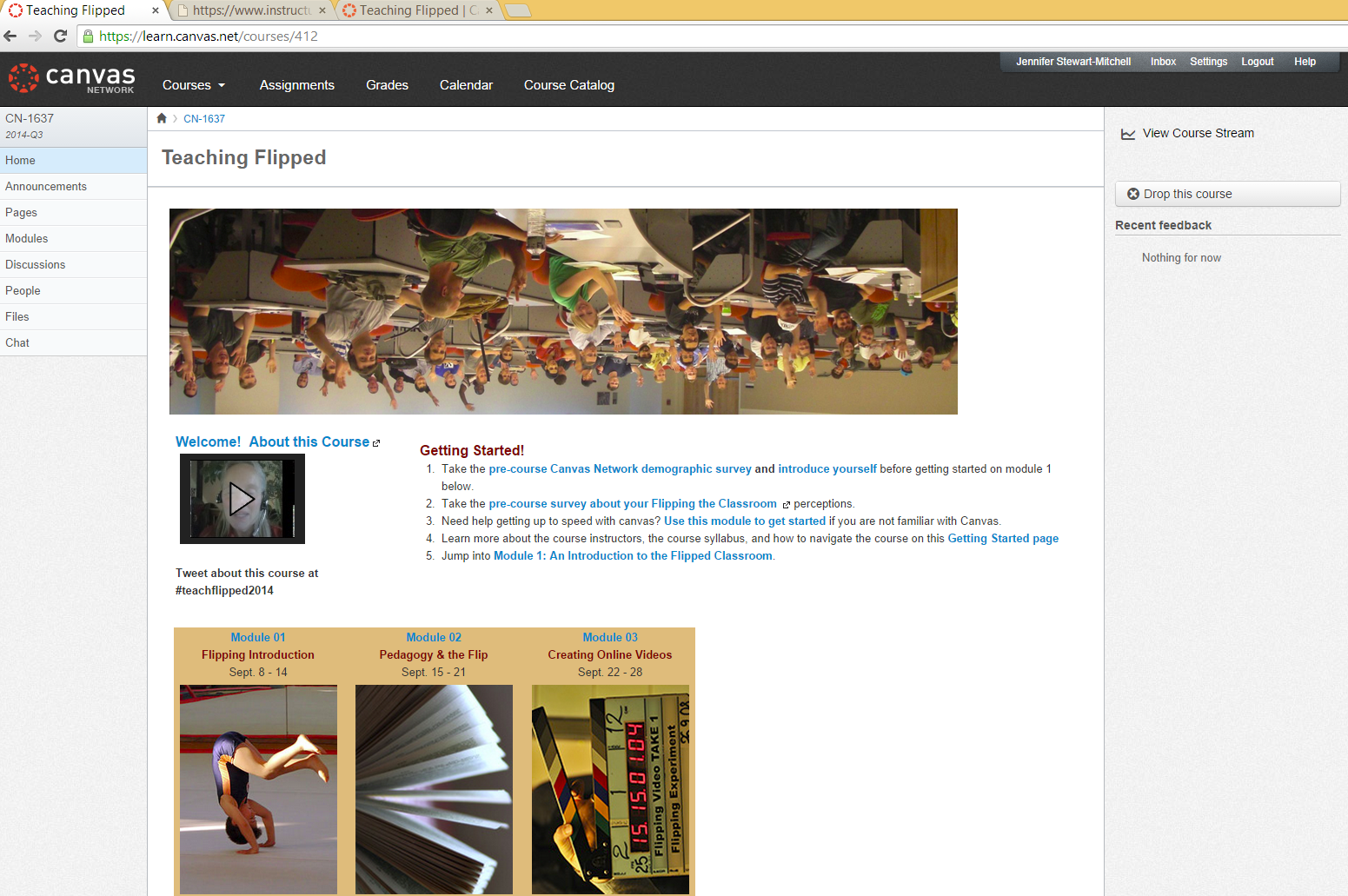
So here is a photo of my enrollment in a "Teaching Flipped" class with Canvas Network. I'm not sure if this is a "reputable MOOC" site like Coursera,  Stanford Free Courses, or MIT Free Courses, but it met my requirements... It was FREE, open for enrollment and looked like something I could apply to my current career.


I have tried to explore the blended learning model, but I didn't really fully immerse my classroom in the model. Now that I don't have my own classroom, but many classrooms in which I will be working, I imagine there might be some teachers interested in exploring this model.

Tonight, I started by examining the course expectations, a few of the modular resources and completed a short survey. One aspect I really appreciated about the survey, was that it had participants state whether or not they were just "an observer", "passive participant" or "Fully engaged participant". It was hard not to laugh. A class that fully acknowledges that you just want to take what you want from the class and not necessarily be bothered by "class requirements" - What a concept! So I plan on just being a "user" of this Flipped Teaching MOOC and just take what I want without too much "emotional" investment. I mean it's not that I don't want to invest in meaningful heartfelt discussions... I feel like that I will already have that with this class! :-)

I think that the whole premise of the MOOC is nicely explained in this video I found on Youtube, when searching that answers the question, "What is a MOOC?"